Pro Tip: Want a Head Start? You can build standard grids with the free version, but WP Team Manager Pro unlocks Smart Image Cropping, Popup Modals, and League Management instantly. Start Your 7-Day Free Trial – No Charge Today ->14 Days Money Back Guarantee!

Overview
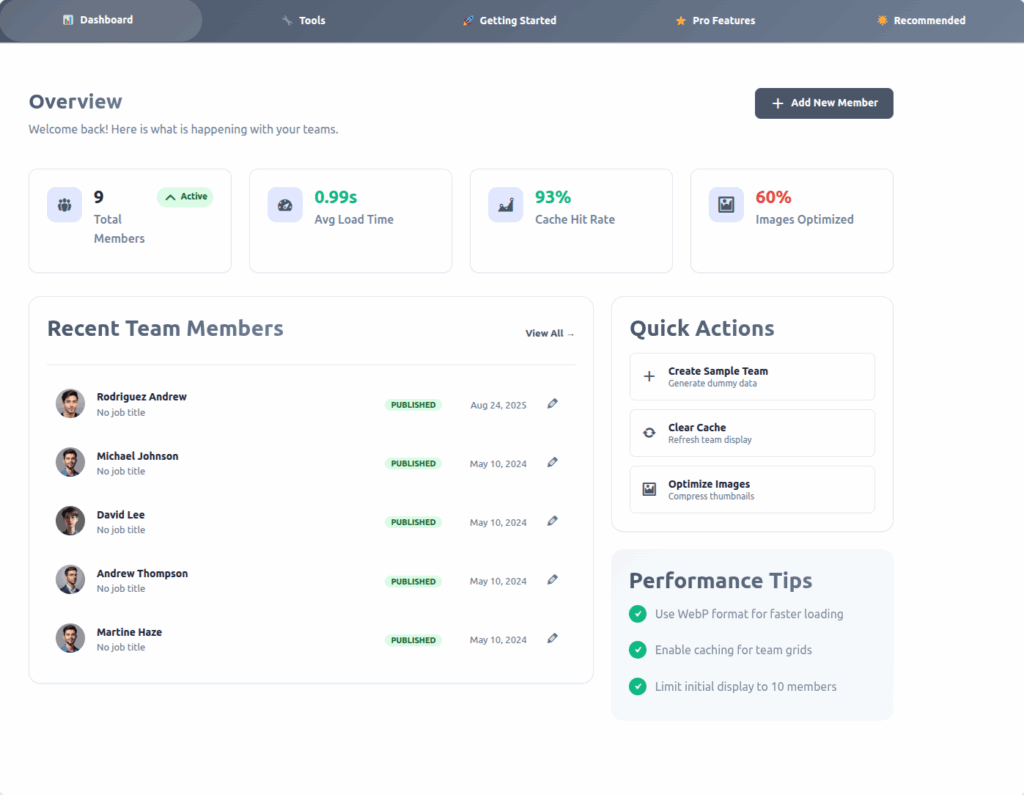
| Metric | Description |
|---|
| Team Members | Shows the total number of active team members in your system. |
| Avg Load Time (s) | Displays the average time taken to load the team section on the site. Aim for under 2 seconds for optimal performance. |
| Cache Hit Rate (%) | Indicates how effectively your system is serving cached team data. A higher percentage means faster data delivery. |
| Images Optimized (%) | Reflects the percentage of team member images optimized for web use. Increasing this improves site speed |
| Action | Function |
|---|
| Create Sample Team | Automatically generates sample team members for testing or demonstration purposes. |
| Clear Cache | Removes stored team data cache to ensure updated information is displayed. |
| Optimize Images | Compresses and converts team images (preferably to WebP format) to improve performance. |
| Add New Member | Opens the form to manually add a new team member to your database. |
| Field | Description |
|---|
| Avatar | Displays the member’s profile image or placeholder icon. |
| Name & Role | Shows the member’s name and job title. |
| Last Updated | Indicates how long ago the member profile was created or updated. |
| Actions | Quick Edit button to modify member details. |
Performance Tips
Optimize Images
- Use WebP format and compress images to improve loading speed.
- Tools: TinyPNG, ShortPixel, or WebP Express plugin.
Enable Caching
- Team data is automatically cached by the plugin to enhance speed.
- If you make major updates, use Clear Cache to refresh data.
Limit Team Size
- For large teams, enable pagination or filtering options to improve dashboard performance and user experience.
Developer Notes
- Cache System: Uses WordPress Transients API for fast data retrieval.
- Image Optimization: Integrated via the plugin’s utility functions or compatible optimization plugins.
- Sample Data: Automatically creates placeholder team members for quick setup.
Best Practices
- Keep team member images under 200 KB for best load times.
- Maintain Cache Hit Rate above 85% for optimal performance.
- Regularly clear cache after bulk updates.
- Use meaningful job titles for better SEO and team organization.
- If managing more than 50 members, enable server-side pagination.