
Pro Tip: Want a Head Start? You can build standard grids with the free version, but WP Team Manager Pro unlocks Smart Image Cropping, Popup Modals, and League Management instantly. Start Your 7-Day Free Trial – No Charge Today ->14 Days Money Back Guarantee!
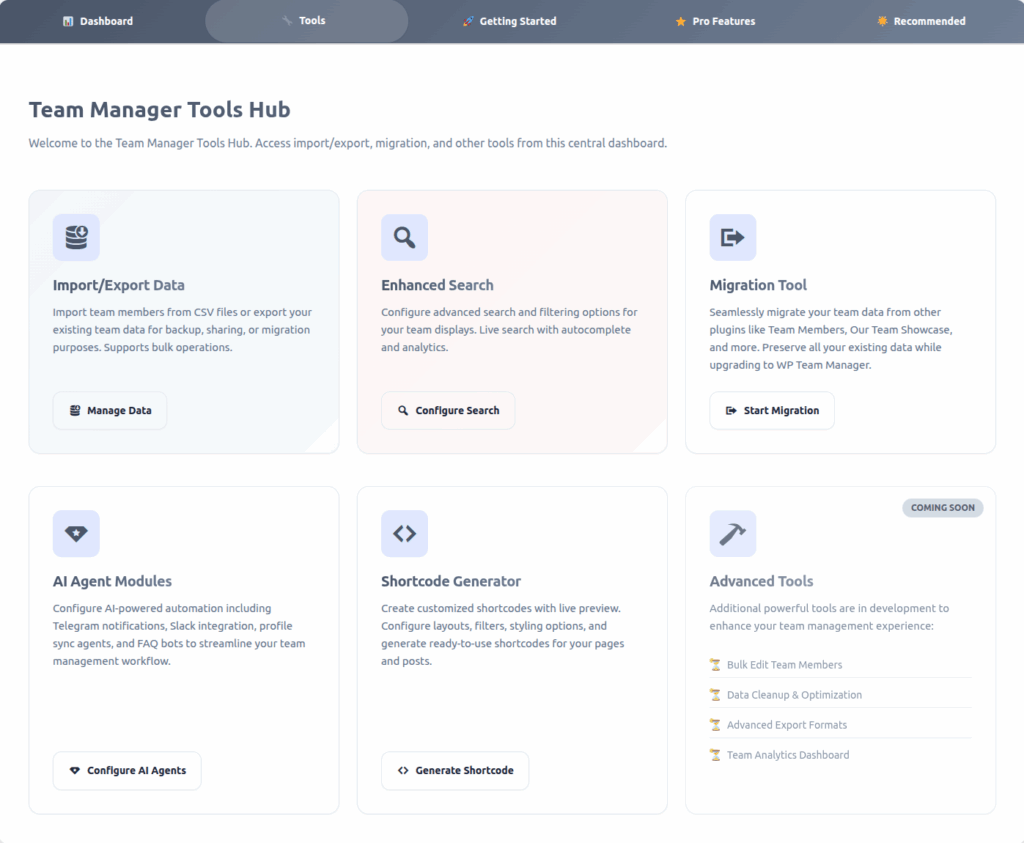
Team Manager Tools Hub — Documentation
Overview
The Team Manager Tools Hub is a central dashboard that brings together all major tools and utilities for managing, migrating, automating, and customizing your team data.
This hub helps administrators work efficiently by providing quick access to all advanced modules in one organized interface.
Purpose:
Manage, migrate, automate, and customize your team data — all from a single convenient location.
Tools Included in the Hub
1. Import/Export Data
Easily import team members or export your existing team database for backup, migration, or sharing.
Features
- Import from CSV
Upload CSV files to bulk-import new team members. - Export Data
Download your team data for backups or external use. - Bulk Operations Support
Designed to handle large teams efficiently. - Error Handling
Automatically detects invalid or duplicate entries. - Secure Transfers
Ensures data accuracy during both import and export.
Button:
- Manage Data
Best Practices
- Always export your data before performing a bulk import.
- Use UTF-8 encoded CSV files to avoid formatting issues.
2. Enhanced Search
Configure advanced search behavior and filtering options to improve how users find team members on your site.
Features
- Search Configuration
Select which fields (name, job title, department, etc.) should be searchable. - Live Search with Autocomplete
Provides instant search suggestions and results. - Custom Filters
Enable or disable filters like department or role. - Analytics Insight
Track common search behaviors for optimization.
Button:
Configure Search
Tip
Enable Live Autocomplete for faster results, especially for large teams.
3. Migration Tool
Migrate your existing team data from other WordPress team management plugins into WP Team Manager without losing information.
Features
- One-Click Migration
Automatically maps fields from supported plugins. - Data Preservation
Keeps profile images, job titles, social links, and metadata intact. - Rollback Safety
Restore your original data if anything goes wrong. - Detailed Logs
Displays migration progress, errors, and results.
Button:
Start Migration
Note
Always back up your site or export your data before running a migration.
4. AI Agent Modules
Add automation to your team management workflow using AI-powered integrations.
Available Modules
- Telegram Notifications
Receive instant updates when team members are added or edited. - Slack Integration
Automatically post team updates to Slack channels. - Profile Sync Agent
Sync team member data across multiple websites/apps. - AI FAQ Bot
Auto-answer common questions about your team and company.
Button:
Configure AI Agents
Benefits
- Saves admin time
- Reduces repetitive tasks
- Keeps teams updated automatically
5. Shortcode Generator
Create fully customizable team shortcodes using an easy, visual generator with live preview.
Features
- Multiple Layouts
Grid, carousel, list, masonry, and more. - Filter & Query Options
Choose which teams, categories, or roles to display. - Styling Customization
Adjust spacing, colors, typography, and design. - Instant Preview
See changes in real time before generating code. - One-Click Copy
Easily paste the shortcode into any page, widget, or editor.
Button:
Generate Shortcode
Example:

Thompson Alexander
UI Designer
Christopher Martinez is a talented UI Designer with a keen eye for detail and a passion for crafting visually stunning and user-friendly digital experiences.
Christopher Martinez
Artist
Christopher Martinez is a talented UI Designer with a keen eye for detail and a passion for crafting visually stunning and user-friendly digital experiences.
Alexander Rodriguez
Cloud Engineer
Christopher Martinez is a talented UI Designer with a keen eye for detail and a passion for crafting visually stunning and user-friendly digital experiences.
Martine Haze
UI Designer
Christopher Martinez is a talented UI Designer with a keen eye for detail and a passion for crafting visually stunning and user-friendly digital experiences.
Andrew Thompson
R&D Engineer
Christopher Martinez is a talented UI Designer with a keen eye for detail and a passion for crafting visually stunning and user-friendly digital experiences.
David Lee
Software engineer
Christopher Martinez is a talented UI Designer with a keen eye for detail and a passion for crafting visually stunning and user-friendly digital experiences.
Michael Johnson
Athlete
Christopher Martinez is a talented UI Designer with a keen eye for detail and a passion for crafting visually stunning and user-friendly digital experiences.
Rodriguez Andrew
Test Captain
Christopher Martinez is a talented UI Designer with a keen eye for detail and a passion for crafting visually stunning and user-friendly digital experiences.
Rodriguez Andrew
Master
Christopher Martinez is a talented UI Designer with a keen eye for detail and a passion for crafting visually stunning and user-friendly digital experiences.
Christopher Martinez
Pace Spearhead
Christopher Martinez is a talented UI Designer with a keen eye for detail and a passion for crafting visually stunning and user-friendly digital experiences.









6. Advanced Tools (Coming Soon)
Upcoming modules designed to further enhance data management, optimization, and analytics.
Planned Features
| Tool | Description |
|---|---|
| Bulk Edit Team Members | Update multiple members at once (roles, departments, etc.) |
| Data Cleanup & Optimization | Remove duplicates, fix broken images, optimize database tables |
| Advanced Export Formats | Export team data in XML, JSON, or API-ready formats |
| Team Analytics Dashboard | View insights and charts about team engagement and growth |
These tools are currently in development and will be released in future updates.
Suggested Workflow
- Import or migrate your team data.
- Configure search for better front-end discovery.
- Use AI agents for notifications or automation.
- Create team layouts with the Shortcode Generator.
- (Soon) Monitor team performance with analytics tools.
Technical Notes
- Uses WordPress custom post type: team_manager
- Migration tool uses safe WPDB operations with rollback
- Shortcodes are compatible with Gutenberg, Elementor, and Classic Editor
- AI modules integrate via Telegram Bot API, Slack Webhooks, and internal APIs
Best Practices
- Always back up before migration or cleanup tasks.
- Test AI agent connections using test channels or sandbox accounts.
- Use the Shortcode Generator for consistent output.
- Regularly export your team data for safety and portability.
- Keep the plugin updated to access new upcoming tools.