
Pro Tip: Want a Head Start? You can build standard grids with the free version, but WP Team Manager Pro unlocks Smart Image Cropping, Popup Modals, and League Management instantly. Start Your 7-Day Free Trial – No Charge Today ->14 Days Money Back Guarantee!
The Accessibility & SEO tab allows you to enhance usability, accessibility, and search engine visibility for all team member content created with WP Team Manager. Below is a complete explanation of each feature and how it improves your site.
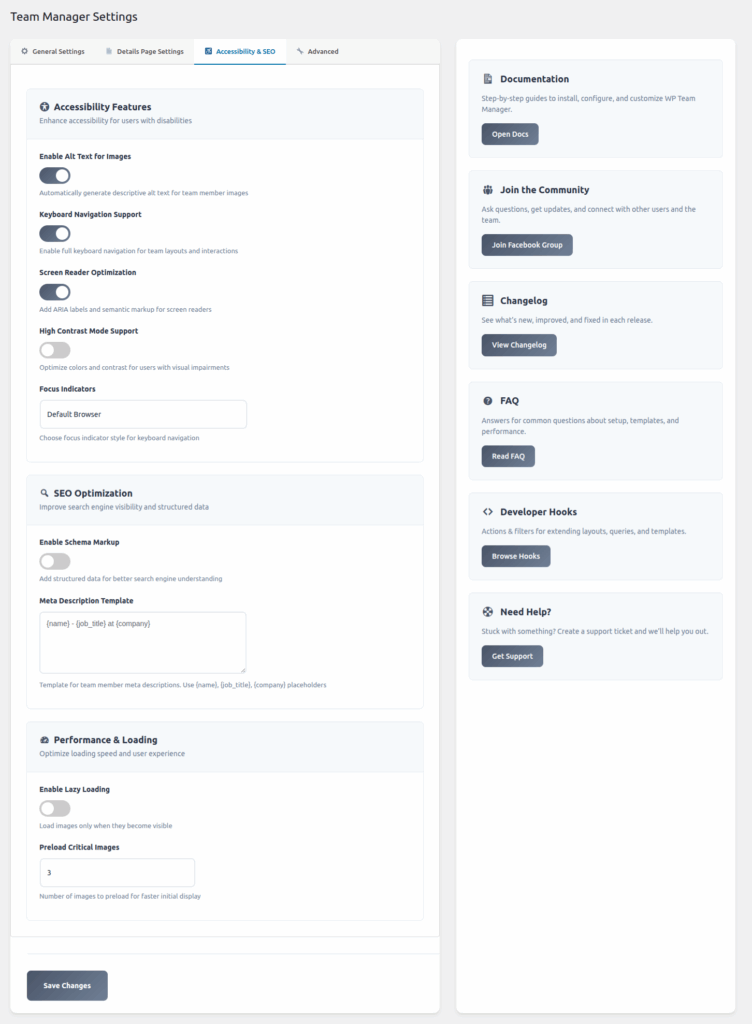
1. Accessibility Features
Improve your team’s reach and user experience for visitors with disabilities. These tools help ensure your team showcase follows modern accessibility standards (WCAG).
1.1 Enable Alt Text for Images
Toggle: On/Off
Description: Automatically generates descriptive alt text for team member images.
Benefit: Improves accessibility for visually impaired users and strengthens SEO by providing meaningful image descriptions.
1.2 Keyboard Navigation Support
Toggle: On/Off
Description: Enables full keyboard navigation across team layouts and interactions.
Benefit: Essential for users who rely on keyboard-only navigation and improves WCAG compliance.
1.3 Screen Reader Optimization
Toggle: On/Off
Description: Adds ARIA labels and semantic HTML markup to assist screen readers.
Benefit: Makes team content easier to understand for assistive devices like JAWS, NVDA, and VoiceOver.
1.4 High Contrast Mode Support
Toggle: On/Off
Description: Enhances contrast of text, buttons, and layout elements for visually impaired users.
Benefit: Helps users with low vision or color-blindness to read and interact with content more easily.
1.5 Focus Indicators
Field: Dropdown (Default Browser / Custom Styles)
Description: Selects the visual style for keyboard focus outlines.
Benefit: Ensures users navigating via keyboard can clearly see which element is selected.
2. SEO Optimization
Boost the visibility of your team pages on search engines with structured data and optimized metadata.
2.1 Enable Schema Markup
Toggle: On/Off
Description: Adds structured data (JSON-LD) to team member pages.
Benefit: Helps search engines better understand team member information and may improve ranking or eligibility for rich results.
2.2 Meta Description Template
Field: Textarea
Default Example:
{name} – {job_title} at {company}
Description: Define a template for automatically generating meta descriptions for team member pages.
Available placeholders:
{name}– Team member’s name{job_title}– Their role or position{company}– Company name
Benefit: Ensures consistent, SEO-optimized meta descriptions for all team member profiles.
3. Performance & Loading
Controls for improving loading speed, especially on pages with many images.
3.1 Enable Lazy Loading
Toggle: On/Off
Description: Loads team member images only when they enter the viewport.
Benefit: Reduces initial page loading time and improves performance scores.
3.2 Preload Critical Images
Field: Numeric input
Description: Select how many team images are preloaded immediately for faster initial display.
Recommendation: 1–3 for optimal performance.
✅ Save Changes
Once you configure your options, click Save Changes to apply them throughout your site.