
Pro Tip: Want a Head Start? You can build standard grids with the free version, but WP Team Manager Pro unlocks Smart Image Cropping, Popup Modals, and League Management instantly. Start Your 7-Day Free Trial – No Charge Today ->14 Days Money Back Guarantee!
Dashboard Mode
Dashboard Mode allows you to switch the plugin’s terminology and field labels based on your specific use case. This feature is designed to make the admin interface and frontend output more intuitive by using language that matches your project type.
Usage
- Go to Team → Settings → General Settings
- Locate the Dashboard Mode section
- Select your preferred Plugin Mode
- Save the settings
Follow the image below.
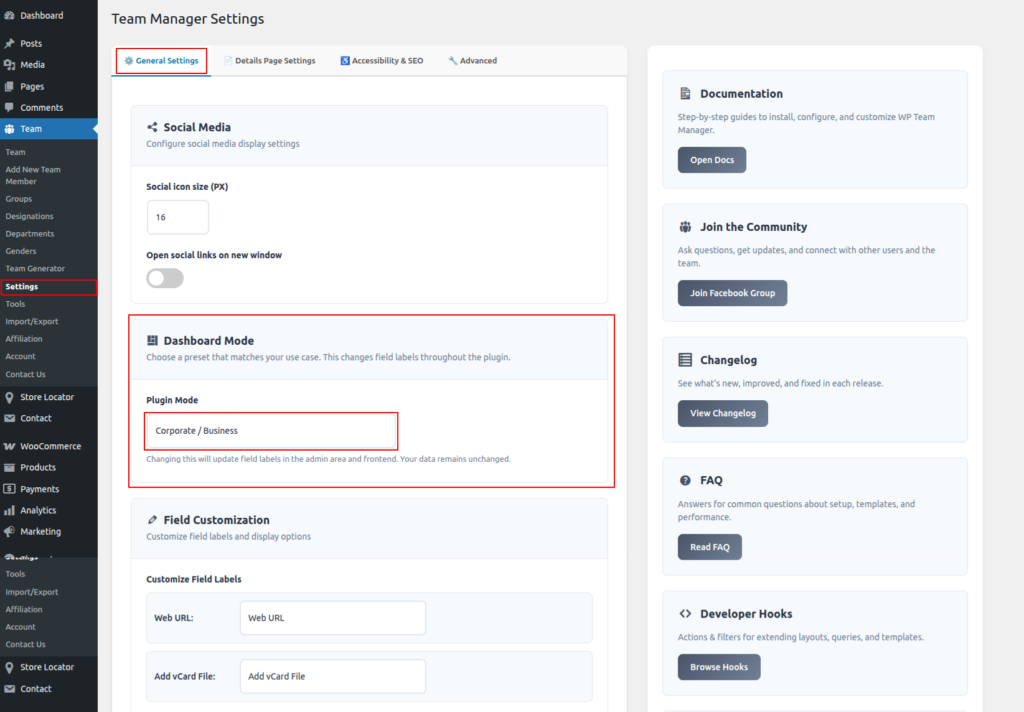
The updated labels will be applied instantly across the plugin.
Important: Dashboard Mode affects labels and wording only. Your existing data, content, and configurations remain completely unchanged.
Plugin Mode
The Plugin Mode setting lets you choose a preset that best fits how you are using the Team Manager plugin.
Available Modes
- Corporate / Business
- Sports League
1. Corporate / Business
Optimized for company websites, staff directories, and organizational teams.
- Uses business-oriented terminology such as:
- Job Title
- Department
- Office Phone
- Experience (Years)
- Ideal for:
- Corporate websites
- Agency team pages
- Company “About Us” sections
- Professional directories
2. Sports League
Optimized for sports teams, clubs, and league-based websites.
- Uses sports-focused terminology such as:
- Position
- Jersey Number
- Team
- Seasons Played
- Ideal for:
- Sports clubs
- League websites
- Player rosters
- Team statistics pages
How It Works
When you select a Plugin Mode:
- Field labels are automatically updated in:
- The admin dashboard
- Team member edit screens
- Frontend layouts and templates
- The underlying data structure remains the same
- Existing team member information is preserved
This ensures a seamless transition between modes without the need to re-enter or migrate data.
Notes & Best Practices
- You can switch between modes at any time.
- Switching modes will not:
- Delete team members
- Modify stored values
- Break existing layouts or shortcodes
- If you need more control, you can further refine labels using the Field Customization options.
When to Use Dashboard Mode
- When adapting the plugin for different industries
- When building multiple sites with different use cases
- When you want clearer, context-aware terminology for clients or editors