
Pro Tip: Want a Head Start? You can build standard grids with the free version, but WP Team Manager Pro unlocks Smart Image Cropping, Popup Modals, and League Management instantly. Start Your 7-Day Free Trial – No Charge Today ->14 Days Money Back Guarantee!
Team Generator – Pagination & Filters Settings
This section allows you to control how team members are loaded and filtered on the frontend.
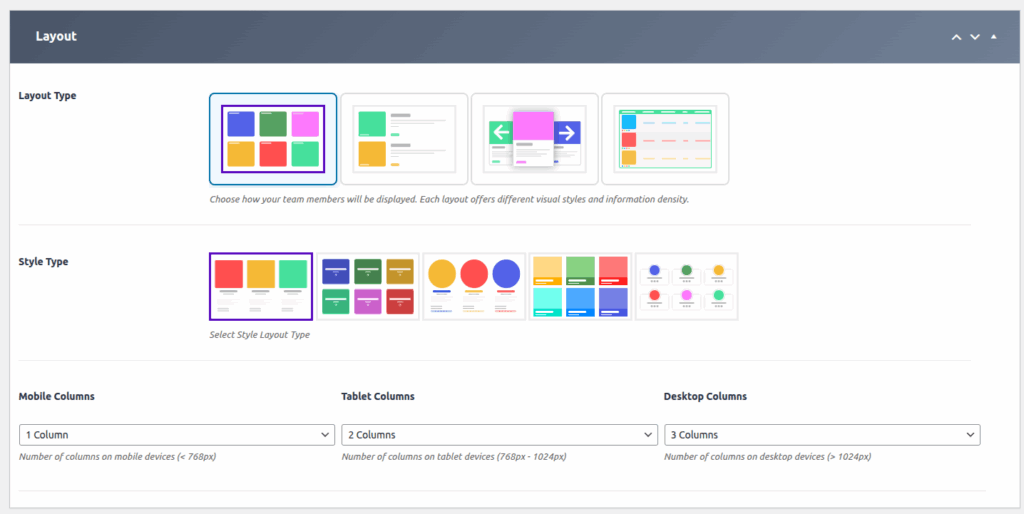
The Grid Layout in WP Team Manager allows you to display your team members in a clean, organized, and customizable grid format. This layout is perfect for showcasing multiple profiles uniformly, with enhanced visual options and flexibility to match your website’s design.
With the latest update, several new features and customization options have been added to give you greater control over the appearance and functionality of your team grid.
1. Access the Team Generator:
- Navigate to the WP Team Manager plugin settings in your WordPress dashboard.
- Select the ‘Team Generator’ option.
2. Choose Grid Layout:
- Within the Team Generator, select ‘Grid Layout’ as your display option.
3. Choose Style Type:
- Within the Team Generator, select ‘Style Type’ as your display option.
4. Choose Responsive Columns:
- Responsive Columns: Set specific column counts for different devices:
- Mobile Columns: Number of columns for devices under 768px.
- Tablet Columns: Number of columns for devices between 768px – 1024px.
- Desktop Columns: Number of columns for devices over 1024px.
Load More & Filters (Pro Feature)
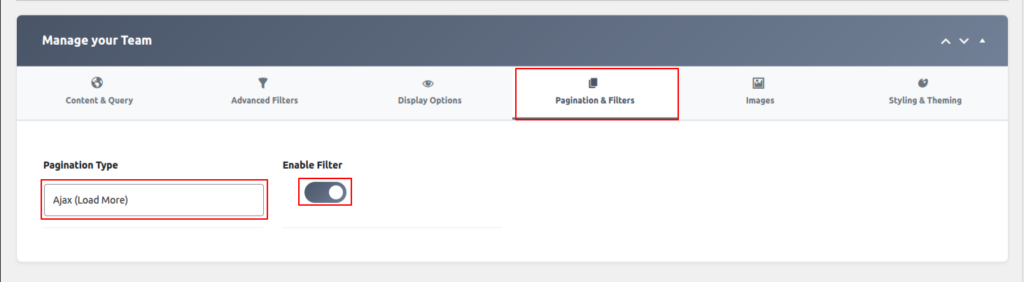
The Load More & Filters feature allows you to display team members dynamically while giving users powerful filtering options for better browsing and performance.
Note: The filter will only work if the filter is enabled and Load More is selected.
Load More (Ajax Pagination)
When enabled, team members are loaded dynamically using Ajax without refreshing the page.
Benefits:
- Faster page loading
- Improved user experience
- Clean and modern interaction
- Ideal for large teams
How it works:
- Initially displays a limited number of team members.
- Clicking the Load More button loads additional members instantly.
Filters
Filters allow users to narrow down team members based on selected criteria.
Available Filtering Options:
- Team Groups
- Categories or Departments
- Keywords
- Custom taxonomies (if available)
Benefits:
- Helps users find specific team members quickly
- Works seamlessly with Ajax Load More
- Updates results instantly without page reload
Combined Usage
When Load More and Filters are enabled together:
- Filtered results load dynamically
- Pagination updates automatically
- No page refresh is required
Notes
- This is a Pro-only feature.
- Requires Ajax pagination to be enabled.
- Recommended for websites with large or categorized teams.